
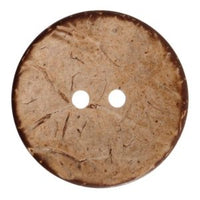


A trim card is a single sheet – physical or digital – that gathers every non-fabric component of one garment style: labels, buttons, zippers, elastics, thread, drawcords, hang tags and packaging. If the tech pack says what has to be sewn, the trim card shows what it is sewn with, using real samples, codes and quantities. That is why factories keep it next to the sewing line and why quality control uses it as the reference. Below we cover what belongs on a trim card, how to build one, and the gaps that most often bring production to a halt.
Why the trim card matters so much
An ordinary shirt carries at least six to eight different trims: a main label, a care and composition label, a size label, front buttons, smaller cuff and collar buttons, a spare button, thread and a hang tag with its string. A jacket easily reaches 15 to 20 lines. Each one has a supplier, a code, a colour, a size and a position on the garment. All it takes is one vague line – say, "black button 15 mm" with no code – and the factory either stops to ask or sews on something "close enough". The trim card removes the guesswork: the operator sees the actual sample and knows exactly what to pick.
 Metal buttons with a pink finish 6104047 Col 255 – 22 mm handmade
 Sewing threads white no. 120
 Satin label 14 cm x 5 cm - satin print
What goes on a trim card: a template
The easiest format is a table in which every row is one trim. These are the minimum fields:
| Field | What to enter | Example |
|---|---|---|
| Trim | Type of component | Front button |
| Supplier | Who makes or supplies it | Company name |
| Code / article | Exact number from the supplier's catalogue | Button model code |
| Colour | Colour code or Pantone reference | Col 101, gunmetal |
| Size | mm, ligne, zipper gauge, width in cm | 24L (15 mm) |
| Material / finish | Polyester, corozo, brass, nickel-free, etc. | Corozo, matt |
| Placement | Exactly where it goes | Centre front, 6 pcs, 9 cm apart |
| Qty per garment | Consumption per unit | 7 (6 + 1 spare) |
| Sample | Physically attached or photo | Button sewn on |
| Approval | Signature, date, version | Approved, 12 March, v2 |
Above the table add a header with the style number, season, collection name, colourway and card version. If a style comes in three colours, make three trim cards – one per colourway – because the button, zipper and thread colours usually change together with the fabric.
How to make a trim card, step by step
- Start from the tech pack. Go through the flat sketch and mark every non-fabric element, including the easy-to-forget ones: the spare button, the hanger loop, the size label, the buttonhole thread.
- Choose specific articles. Write down the exact supplier code for every line. If a trim is custom – a woven label with your logo, for example – record the approved artwork number.
- Collect physical samples. Ask suppliers for swatches and samples. On-screen colour and the colour of a real button or zipper almost never match perfectly.
- Attach the samples. Use heavy board (300 gsm or more). Sew the buttons on, staple or tape the zipper and elastic, tack each label with a single stitch at the corner. Write the code and position beside each one.
- Add a swatch of the shell fabric. That way the colour pairing is checked in one place: button against fabric, thread against fabric, zipper against fabric.
- Record consumption. Quantity per garment plus an allowance for waste and spares – typically 2–5% for small trims.
- Sign and date it. The approved card gets the responsible person's signature and a version number. Any later change means a new version.
Tip: make at least two identical physical cards – one stays with you, the other goes to the factory. When a question comes up on the phone, both sides are looking at the same sample.
Physical or digital trim card?
A digital trim card (in Excel, Google Sheets or a PLM system) is easy to send, edit and link to your costing. What it cannot show is true colour, texture and sheen. A physical card shows the truth but gets lost, goes out of date and cannot be copied with one click.
Best practice is to use both: the digital sheet is the master document holding codes, quantities and versions, while the physical card is the approved standard for colour and appearance. The codes on the two must match line by line. When the trim card numbers feed straight into the BOM in your tech pack, the factory can look up any spec instantly.
Sign-off: who approves and when
A trim card is approved in two stages. First at the proto or fit sample, when you check that the trims actually work: does the button pass through the buttonhole, is the zipper long enough, does the elastic hold? Then before bulk, on the pre-production sample, when you check final colour and quality from the real production lot. Only after the second signature is the card frozen and the factory free to start.
The mistakes that most often stall production
- A description instead of a code. "White zipper 20 cm" could be coil, metal, invisible, open-end or closed-end. Without a code and gauge (#3, #5) the factory will wait for an answer.
- One colour for every colourway. The card was made for the black version, and the beige one gets black buttons because nobody spelled out the difference.
- Forgotten thread. Thread colour and weight are trims too. Ticket 120 for shirts and light fabrics, ticket 80 for heavier ones – write it down, especially if you use sewing thread in several colours.
- No allowance. Trims are ordered for exactly the number of garments, and 2–3% get lost or rejected during sewing.
- Unsigned changes. Someone swaps a button over the phone, the card is never updated, and half the run has one button and half another.
- Ambiguous size units. Buttons are measured in mm or lignes (1 ligne = 0.635 mm). Give both if your supplier works in lignes.
- Labels without a position. Main label at centre back neck or in the side seam? How many mm from the edge? Without that, every machinist places it differently.
Quick checklist before you send the trim card
- Does it show style number, season, colourway and version?
- Does every trim have a code, colour, size and placement?
- Is there a physical sample, or at least an exact code, for every line?
- Is consumption per garment plus allowance recorded?
- Has the responsible person signed it?
How Bul-tex can help
Bul-tex manufactures and supplies garment trims – buttons, zippers, labels, elastics and ribbons – and takes custom orders for brands. If you are putting together a trim card for a new collection, we can send codes and samples of stock items so you can attach them as early as the prototype stage. Browse more of our manufacturing guides or get in touch with your trim list.


